


Small format, big mix
Get a streamlined yet versatile mixing system for the modern sound engineer. Based on the award-winning Avid S6 control surface, Avid S3 delivers intelligent control over every aspect of Pro Tools and other DAWs. All in a more portable and affordable surface. But don’t let its small size fool you. While it’s ideal for space-confined and on-the-go mixing, it packs enormous power to handle large sessions and turn around projects faster. Plus, it pairs perfectly with Avid Dock and the Avid Control app to extend your workflow further.
PRODUCT HIGHLIGHTS
Access every aspect of your mix
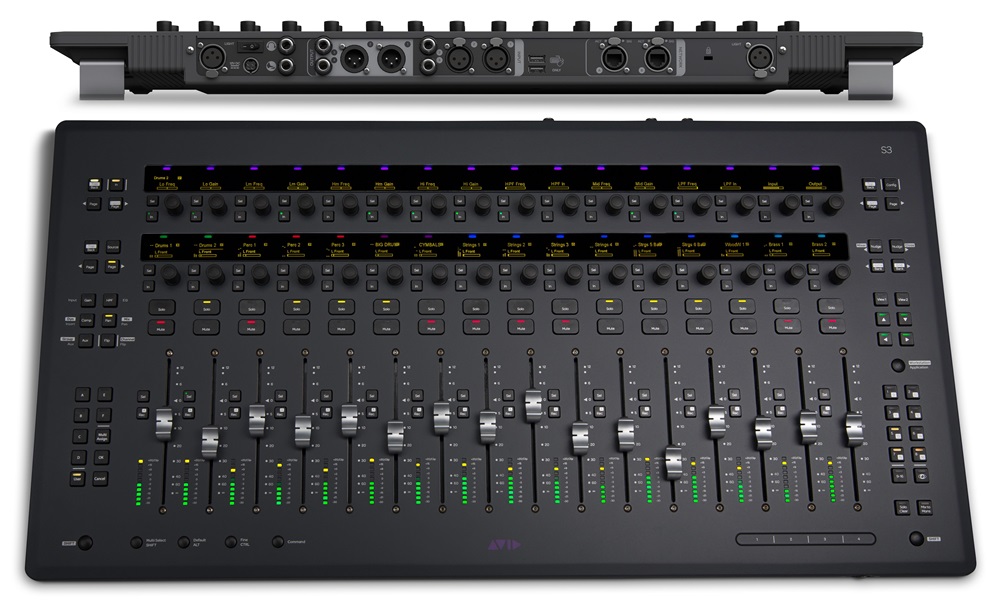
View, access, and adjust multiple facets of your music or soundtrack project quickly using the 32 touch-sensitive, push-button style rotary encoders. Use the top-row channel control encoders to make changes to inputs, inserts, sends, groups, and more. Use the second row of assignable channel encoders separately to control plugins, pan, EQ, compressor, and other parameters. And view names, settings, status, channel metering, and more through the 32 OLED displays.
Plug in and record
No need to use a separate audio interface to record and monitor sessions. Avid S3 features a built-in 4-input, 6-output AVB Core Audio interface to connect your studio (Mac only). Record vocals and instrument performances through two high-quality XLR mic/line inputs and two TRS line inputs. And connect studio speakers, headphones, and other gear to four line outputs and one stereo headphone output.
Gain great mixing flexibility
Avid S3 supports EUCON, a high-speed Ethernet-based technology that enables the hardware to communicate directly with any EUCON-enabled application -and vice-versa. That means you can use it to control Pro Tools, Cubase, Nuendo, Logic Pro, and other audio software to speed and ease recording and mixing tasks. And when paired with Avid Dock and/or the free Avid Control app, you gain full monitor control capabilities, touchscreen workflows, and customizable soft keys.
New features
Navigate sessions more easily
When using S3 with Pro Tools, the surface now fully supports ICON-favorite "œScroll to Track" and "œScroll into View" features, making it easy to scroll Pro Tools windows and bank your control surface accordingly to get to the tracks you need faster. And with the latest EUCON software, you can open and close Pro Tools Folder Tracks right from the surface, greatly speeding up session navigation.
Work faster and more flexibly
You can also now set Plug-in, Pan, and Send windows to open and close automatically whenever you select them for editing to speed things along. You can also suspend all faders from following automation, view fader values in track name displays for a custom length of time, and enable/disable all plugin automation with a surface shortcut. And when using S3 with Avid Dock and/or Avid Control, you can take full control of any EUCON-based monitoring system, including Pro Tools | MTRX, XMON, D-MON, and monitor sources in your DAW.
Bring S3 to your attention
Set how S3 reacts to actions you perform in your DAW. Simply select the behaviors and DAW areas you’d like to engage to attention in your EUCON General settings. For example, if you select "œName" to be actionable, you can click on any track name in your DAW and S3 will automatically attention that same track on its surface. Or select "œFader" and whenever you click on a fader in your software, S3 will automatically put that fader into focus.
Spill VCAs on the S3 surface
Using the Avid Control app or Avid Dock with your S3? Tap on any VCA master in the Avid Control app and its slaves will spill directly onto your S3 surface for easy access and control. When finished, simply retap the VCA master to “unspill” the tracks.
Control surface features
Take complete control of your studio
Experience the deep and versatile DAW control only Avid can deliver. With its intelligent, ergonomic design and EUCON support, S3 puts tightly integrated recording, editing, and mixing control at your fingertips. Work smarter and faster -with your choice of apps -to expand your mixing capabilities and job opportunities. And because S3 is application-aware, you can switch between different DAWs in seconds. Plus, its compact footprint fits easily into any space, giving you full reign of the "œsweet spot."
Work smarter and faster
S3 combines a traditional console layout with the advancements of Avid S6, ensuring intuitive operation, regardless of your experience level. From interacting with tracks and editing plugins, to writing automation, you get the tactile control you need to create better mixes faster. With much more precision than working with a keyboard and mouse. Plus, when paired with Avid Dock and the Avid Control app, you can accelerate your efficiency even more.
Experience exceptional integration and ergonomics
No other surface offers the level of DAW integration and versatility that Avid control surfaces provide, and S3 is no different. Its intuitive controls feel like an extension of your software, enabling you to mix with comfort, ease, and speed. Plus, you’ll get plenty of rich visual feedback to inform and guide you towards creating that perfect mix.
Create your mix, your way
With EUCON technology at its core, not only can you mix sessions using Pro Tools, Logic Pro, Cubase, and other DAWs, you can also customize the surface for your task at hand. Create up to 12 custom mixer layouts and recall them to the surface at any time. It’s ideal for mixing drums, vocals, dialog, sound effects, and other groupings. Plus, you can switch between applications with ease, giving you the choice to work with what you want. And the capability to take on any project that comes your way.
Set up a studio in any size space
Whether you’re at home, tucked in a small suite, or on the go, S3’s compact size, power, and extensive DAW control put you in the driver’s seat of your studio. Wherever you want it to be. What’s more, S3 features a built-in 4×6 interface, enabling you to record, mix, and monitor sessions with just the surface and your laptop (supports 48 kHz and 96 kHz, Mac only). Or monitor audio using S3 standalone. No additional audio interface required.
Use the same technology pros trust
S3 delivers incredible workflow acceleration, highly responsive handling, and deep DAW integration. All of it built on proven technology, trusted by top audio professionals in the most demanding production environments. The result: you get the exceptional, dynamic performance you need to deliver the best sounding mix possible -on time, every time.
EUCON features
Experience deep, integrated control
Avid S3 features EUCON, enabling the hardware to fully integrate with your favorite creative applications. This groundbreaking technology communicates control information for faders, knobs, displays, and more between the surface and whatever application is in focus on your computer. And because it’s application-aware, you can work with multiple applications and quickly switch between them at the touch of a button.
Work with your favorite tools
With S3, you get a versatile control surface that plays extremely well with others. Record, edit, and mix music and audio in Pro Tools, Pro Tools | Ultimate, Media Composer, Nuendo, Pyramix, Logic Pro X, Cubase, and more.
Control multiple apps and workstations
With seamless application switching, the surface instantly adapts all controls and displays to your current audio or video software in seconds. You can even lock parts of the surface to one app while using the rest to switch between apps -perfect for monitor and transport controls. You can also control multiple workstations running any compatible EUCON-enabled software on your extended network from one surface -ideal for multi-workstation workflows and facilities with machine rooms.
Get great flexibility for the future
Avid continues to develop EUCON, making it easy for our partners to introduce new features and functionality to your favorite software titles through updates. In fact, EUCON even supports HUI and Mackie Control protocols, giving you even greater versatility in any studio.
HARDWARE SPECIFICATIONS
| Channel strips/faders | 16 (up to 6 fader banks) |
| Encoders | 32 total (each with highresolution OLEDs and tri"“color function indicator) - 16 assignable encoders, 8 channel control encoders, 8 global control encoders |
| Metering | 16 10"“segment meters, with pre"“and post"“fade metering options |
| Analog inputs | 4 total -2 XLR mic/line inputs and 2 TRS line inputs for connecting mics, instruments, and other devices for recording (supports 48 kHz and 96 kHz, Mac only) |
| Analog outputs | 4 total -2 XLR line outputs and 2 TRS line outputs for connecting studio monitors (supports 48 kHz and 96 kHz, Mac only) |
| Headphone output | 1 (1/4"“inch TRS) with level control |
| Ancillary I/O | 2 USB 2.0 ports (for connecting a keyboard and mouse), 1 footswitch port (1/4"“inch TRS), Kensington lock slot |
| Height (front, rear w/knobs) | 1.3 inches, 2.8 inches (3.2 cm, 7.2cm) |
| Width | 28 inches (71 cm) |
| Depth | 14.3 inches (36.3 cm) |
| Weight | 13.8 lbs (6.2kg) |


Reviews
There are no reviews yet.