


Have an effect
Find your voice
Make a production out of it
Unique to the MiNiSTUDIO Creator is a powerful Creator / Broadcast selector switch on the front panel of the device. When set to Broadcast mode, the audience will hear exactly what you hear as all audio generated my the MiNiSTUDIO and/or your computer will be mixed together in a single stereo stream. Talk, play guitar, play games or play MP3 files. If you hear it, they hear it. But flick the switch to Creator and you’re in full production mode.
When set to Creator, the MiNiSTUDIO transforms into a professionally specced two-channel USB Audio Interface. Perfectly suited for any DAW or video editing software, the combination of dual HDDA mic preamps, Hi-z inputs, EQ, compression and reverb deliver a powerful and flexible front end for any media production task.
Features at a glance
Audio interface functions
- Support for high-resolution recording formats up to 96kHz/24-bit
- Supports Windows (ASIO/WDM) and Mac (Core Audio)
- USB2.0 computer connection
- Compliant with USB Audio 2.0
- Can be connected to an iOS device using an Apple Lightning-USB camera adapter (sold separately).
- USB bus power operation supported when connected to a computer
- Operation confirmed with major DAW software, including Sonar, ProTools, Cubase, Live, Studio One and GarageBand
- Operation confirmed with major streaming and calling software
Hardware functions
- 2 HDDA (High Definition Discrete Architecture) mic preamps
- XLR/TRS input jacks support balanced input and can provide 48V phantom power
- Mini jack mic input (MIC 1)
- Supports connection of 4-pole earphone with mic
- Stereo mini jack AUX input that can be used to connect portable audio players and game devices
- Built-in omnidirectional condenser mic
- Support for low-level dynamic mic input signals
- DSP effects (equalizer, compressor and reverb)
- Input monitoring function allows input sounds to always be heard before they are transmitted
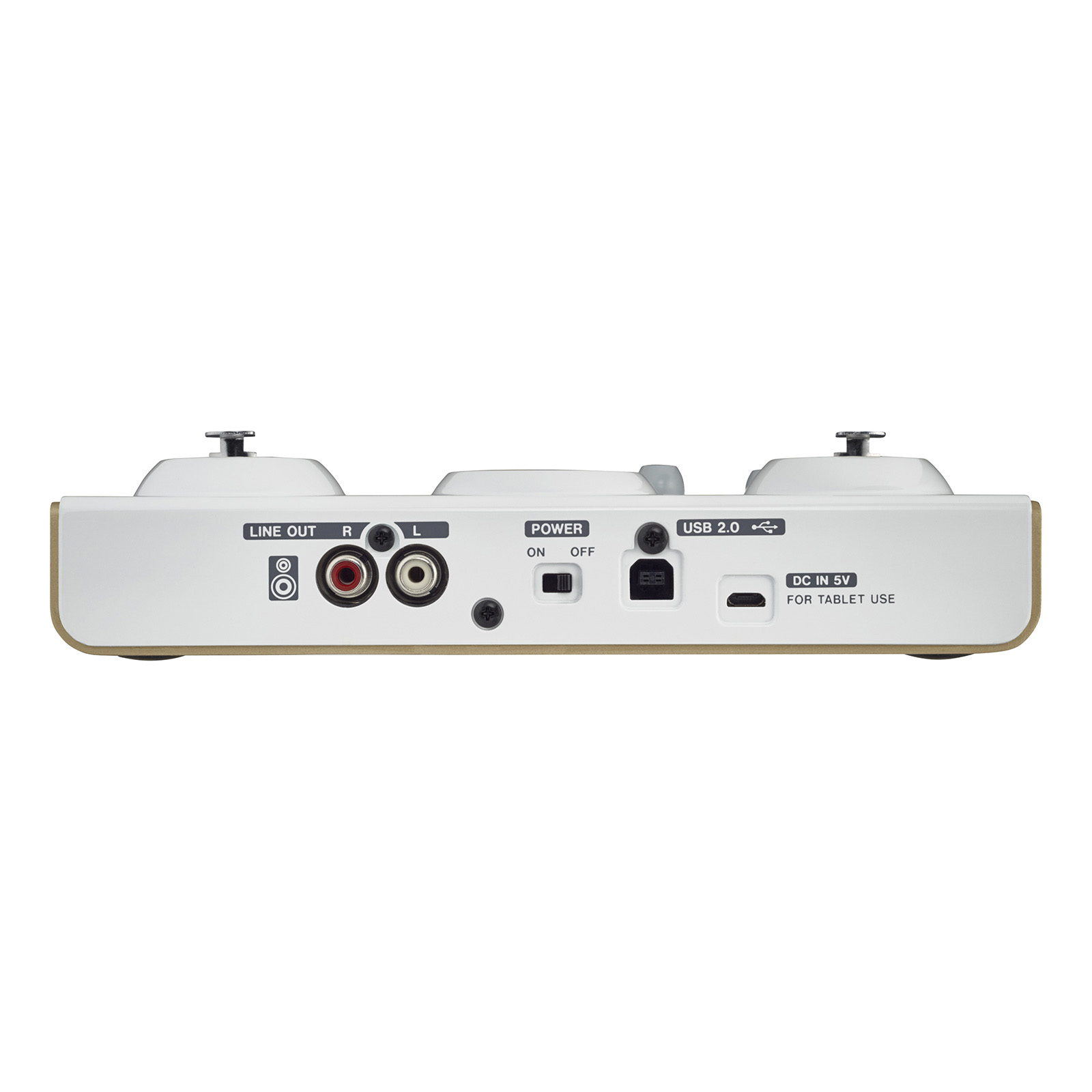
- Stereo analog RCA output jacks suitable for connection to powered monitors
- 3 PON trigger pads that are self-lighting and velocity-sensitive
- REVERB knob that can be used to adjust the amount of reverb
- Voice effect on/off button
- ON AIR button that starts transmission to the computer
- Stereo mini jack headphone output
- 1/4" headphone output
- Separate controls for line and headphone output volumes
- BROADCAST/CREATOR mode switch
Software functions
- Dedicated software has EASY and EXPERT tabs
- Audio files can be assigned to PON trigger pads by dragging and dropping
- Velocity can be turned on/off for PON trigger pads
- PON trigger pad volume adjustment
- PON trigger pad repeat ON/OFF
- PON trigger pad fade in/out setting
- PON trigger pad start time setting
- 4 sound presets with equalizer and compressor settings
- 5 voice effect presets
- Voice effect parameter adjustment
- 5 reverb presets
- Reverb type and parameter setting (HALL/ROOM/LIVE/STUDIO/PLATE)
- Buffer size setting (64/128/256/512/1024) function (Windows only)
- Mic input MONO/STEREO switching (MONO in BROADCAST mode, STEREO in CREATOR mode)
- Transmitted signal MONO/STEREO switching
- ASIO ON/OFF switch that allows mic audio to be transmitted after effect processing (Windows only)
- Loopback function that mixes computer audio with transmitted audio
(automatically OFF in CREATOR mode - PC Audio Out (PC output sound) and Master Out (audio transmitted to PC) volume adjustment
Other features
- Lightweight design convenient for mobile use
- 2 strap attachment points allow commercially-available camera straps to be attached
- Product compliant with RoHS
* Restrictions when connecting iOS devices
- PON trigger pads do not function.
- Effect type settings cannot be changed.
- External power supply is necessary.
- This unit will not provide power to the iOS device.
- You will need an Apple Lightning to USB Camera Adapter (sold separately) for connection.
Spec description
| MiNiSTUDIO PERSONAL | MiNiSTUDIO CREATOR | |
| Sampling frequency | 44.1k / 48k / 88.2k / 96k Hz | |
| Quantization bit rate | 16/24-bit | |
| Analog audio inputs | ||
 MIC IN (Top Panel) MIC IN (Top Panel) |
||
| Connectors (Balanced) | XLR-3-31 / 1/4″ (6.3mm) TRS Phone Combo jack × 2 (1: GND, 2: HOT, 3: COLD), (T: HOT, R: COLD, S: GND) |
|
| Input impedance | 2.4k Ohm | |
| Nominal input level | ||
| VOLUME knob at MAX | "“65dBu (0.0004Vrms) | |
| VOLUME knob at MIN | "“20dBu (0.0775Vrms) | |
| Gain range | 45dB | |
 MIC IN (Front Panel) MIC IN (Front Panel) |
||
| Connectors (with plug-in power) | 1/8″ (3.5mm) 4-pole Mini jack (for headset) × 1 1/8″ (3.5mm) Mini jack × 1 |
|
| Input impedance | 5k Ohm or more | |
| Gain range | 45dB | |
 Built-in mic Built-in mic |
||
| Type | Omnidirectional Condenser Mic | "“ |
| Gain range | 45dB | "“ |
 Instrument inputs Instrument inputs |
||
| Connector (Unbalanced) | "“ | 1/4″ (6.3mm) TS Phone jack × 2 (T: HOT, S: GND) |
| Input impedance | "“ | 1M Ohm or more |
| Gain range | "“ | 45dB |
 External input External input |
||
| Connector | 1/8″ (3.5mm) Stereo Mini jack × 1 | |
| Input impedance | 5k Ohm or more | |
| Maximum input level (VOLUME knob at MIN) |
7.7dBV (2.427Vrms) | |
| Analog audio outputs | ||
| LINE OUT | ||
| Connector | "“ | RCA Pin jacks × 1 pair |
| Output impedance | "“ | 200 Ohm or more |
| Nominal output level | "“ | "“10dBV (0.316Vrms) |
| Maximum output level | "“ | 6dBV (1.995Vrms) |
| PHONES | ||
| Connectors | 1/4″ (6.3mm) Stereo Phone jack × 1 1/8″ (3.5mm) 4-pole Mini jack (for headset) × 1 1/8″ (3.5mm) Stereo Mini jack × 1 |
|
| Maximum output level | 15mW 15mW or more (THD N 0.1% or less, into 32 Ohm load) | |
| Control I/O | ||
| USB | ||
| Connector | USB B-type ×1 | |
| Format | USB 2.0 High Speed (480Mbps) | |
| DC IN 5V | ||
| Connector | USB Micro B type × 1 | |
| Supported audio drivers | ||
| Windows | ASIO2.0  , WDM , WDM |
|
| Mac | Core Audio | |
| iOS device | Core Audio for iPhone | |
| Power | ||
| Used with a computer | USB bus power | |
| Used with an iOS device | USB power adapter (that can supply 5 V and a current of at least 700 mA) *1 External battery pack (that can supply 5 V and a current of at least 700 mA) *2 |
|
| Power consumption | 1W | 1.5W |
| Dimensions (W×H×D) | 5.9″ × 1.57″ × 5.1″ / 150 × 40 × 130 mm | 7.87″ × 1.57″ × 5.1″ / 200 × 40 × 130 mm |
| Weight | 0.84 lbs. / 382 g | 1.1 lbs. / 500 g |
| Operating temperature range | 41?F to 95?F / 5?C to 35?C | |
| Included items | USB cable , Owner’s manual (with warranty) | |
*1 We strongly recommend using the USB power adapter included with the iPad/iPhone. No USB power adapter is included with an iPod Touch.
To use it with an iPod Touch, purchase a genuine Apple USB power adapter (that can supply 5 V and a current of at least 700 mA) separately.
*2 We strongly recommend using a TASCAM BP-6AA external battery pack. If using another external battery pack or mobile battery, purchase one that can supply 5 V and a current of at least 700 mA
Audio performance
| MiNiSTUDIO PERSONAL | MiNiSTUDIO CREATOR | |
| Frequency response | ||
| at 44.1k / 48k Hz | ||
| LINE OUT | "“ | 20Hz: 0dB/"“1dB (MIC IN 1/2, JEITA) 20kHz: 0dB/"“1dB (MIC IN 1/2, JEITA) |
| Headphones out (1/4″ stereo jack) |
20Hz: 0dB/"“1dB (MIC IN 1, JEITA) 20kHz: 0dB/"“3dB (MIC IN 1, JEITA) |
20Hz: 0dB/"“1dB (MIC IN 1/2, JEITA) 20kHz: 0dB/"“3dB (MIC IN 1/2, JEITA) |
| at 88.2k / 96k Hz | ||
| LINE OUT | – | 20Hz: 0dB/"“1dB (MIC IN 1/2, JEITA) 40kHz: 0dB/"“1dB (MIC IN 1/2, JEITA) |
| Headphones out (1/4″ stereo jack) |
20Hz: 0dB/"“1dB (MIC IN 1, JEITA) 40kHz: 0dB/"“3dB (MIC IN 1, JEITA) |
20Hz : 0dB/"“1dB (MIC IN 1/2, JEITA) 40kHz: 0dB/"“3dB (MIC IN 1/2, JEITA) |
| Distortion | 0.008% or less (MIC IN 1 †’ Headphones output, 1kHz sine wave, at nominal input level and maximum output level, JEITA) |
0.005% or less (MIC IN 1/2 †’ LINE OUT, 1kHz sine wave, at nominal input level and maximum output level, JEITA) |
| S/N ratio | 90dB or more (MIC IN 1 †’ Headphones output, VOLUME knob at MIN, JEITA) |
100dB or more (MIC IN 1/2 †’ LINE OUT, VOLUME knob at MIN, JEITA) |
| Crosstalk | 95dB or more (MIC IN 1 †’ Headphones output, 1kHz sine wave, JEITA) |
95dB or more (MIC IN 1/2 †’ LINE OUT, 1kHz sine wave, JEITA) |
| Mic amp EIN (equivalent input noise) |
"“113dBu or less (150 Ohm termination, VOLUME knob at MAX) |
"“120dBu or less (150 Ohm termination, VOLUME knob at MAX |
Comparison chart
| MiNiSTUDIO PERSONAL | MiNiSTUDIO CREATOR | |
| Ideal applications | Personal broadcasting, Voice chat | Personal broadcasting, Voice chat, Audio/video creation |
| PON trigger function | ? | ? |
| Reverb | ? | ? |
| Voice effects | ? | ? |
| Loop playback | ? (always ON) |
? (switched ON/OFF with mode) |
| Portable device (AUX) input | ? | ? |
| Built-in mic | ? | "“ |
| Number of mic inputs (XLR/TRS jacks) | 1 | 2 |
| Direct guitar input | "“ | ? |
| Mic preamps | High-quality mic preamp | HDDA mic preamps |
| Number of headset mic inputs | 1 | 1 |
| Number of headphone output jacks | 2 | 2 |
| External speaker (line) outputs | "“ | ? |
| Mode switching | "“ | ? |
Supported OS’
Windows
Windows 10 (May 2019 Update) , Windows 8.1 , Windows 7
Mac
macOS Catalina New , macOS Mojave , macOS High Sierra (10.13) , macOS Sierra"Ž (10.12) , OS X El Capitan (10.11) , OS X Yosemite (10.10) , OS X Mavericks (10.9)
iOS
iPadOS New , iOS 13 New , iOS 12 , iOS 11 , iOS 10 , iOS 9 , iOS 8 , iOS 7


Reviews
There are no reviews yet.